
A port of DOS Navigator to Free Pascal.
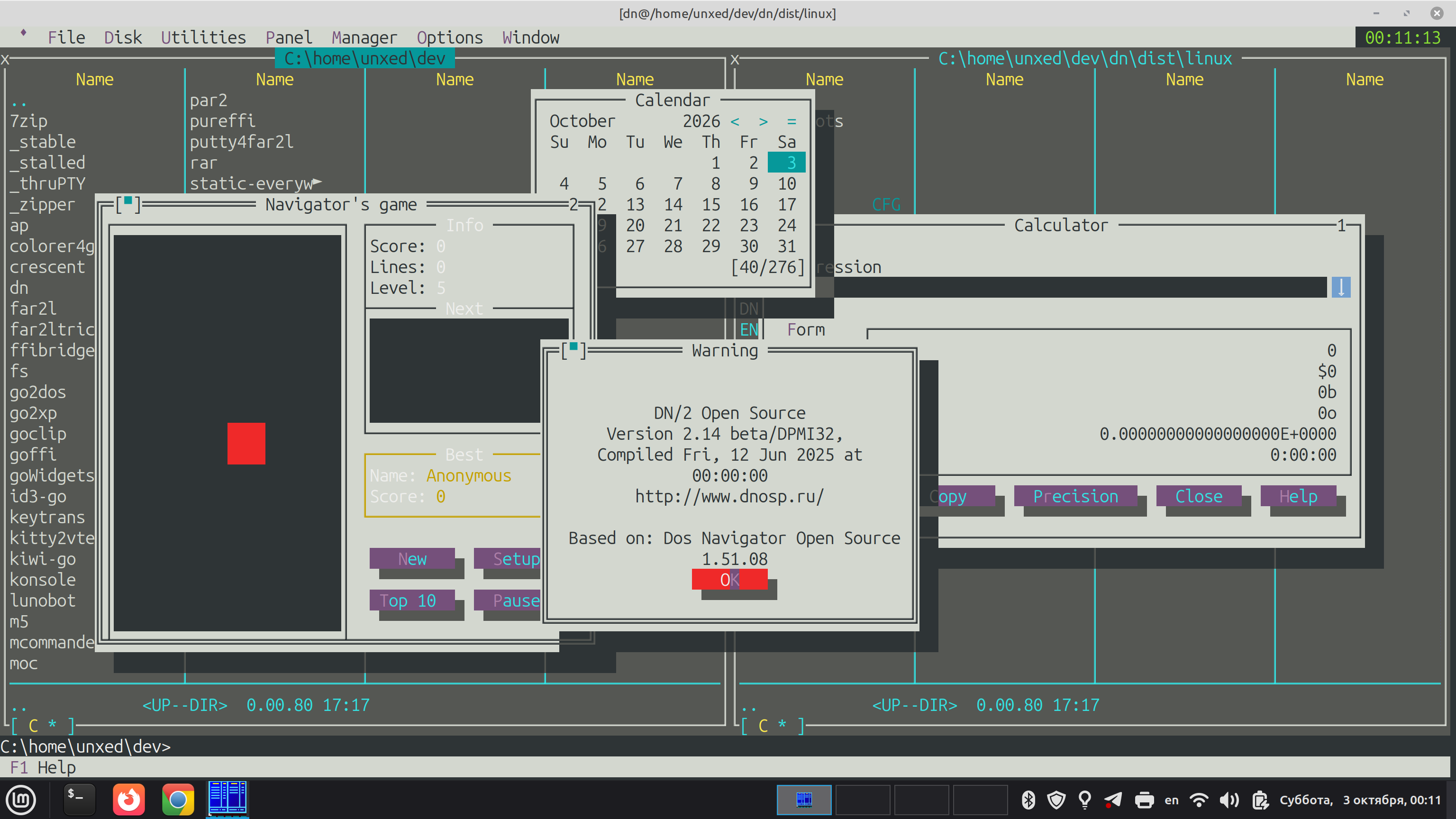
The repository holds two independent projects with different licenses and one shared toolset:
| Directory | What it is | License | Where the code comes from |
|---|---|---|---|
tv/ |
a git submodule: the repository unxed/tv (it was a directory of this repository until 2026-10-03). TV: a Pascal translation of the magiblot/tvision library, its own backends (memory, DOS), tests, demos | Borland disclaimer + MIT (tv/COPYRIGHT.magiblot, tv/LICENSE) |
magiblot/tvision (its code comes from the TV 2.0 release published by Borland and the MIT contribution of magiblot) and our new code |
dn/ |
DN: the file manager itself, sources in git | DN files: the DN license (not relicensed); our files: MIT (dn/LICENSE.md) |
the public release of DN OSP 2.14 (the path: bootstrap/) and our new code |
bootstrap/ |
a record of how the first commit of dn/src was made from the public archive, and a way to reproduce it |
MIT | our code |
audit/, tools/, research/, .github/ |
the detector of Borland code, build and checks, research | n/a | our code |
Our new code, which is not part of the RIT Labs source files and their descendants, is under MIT, like magiblot's (LICENSE).
You need: fpc 3.2.x (check with fpc -iV; on Debian/Ubuntu sudo apt install fp-compiler fp-units-rtl), python3, git. Nothing else (no Lazarus, no libraries).
git clone --recurse-submodules https://github.com/unxed/dn && cd dn     # tv/ is the submodule unxed/tv; the scripts fetch it themselves if you forgot
tools/build.sh linux64            # x86_64 Linux: builds DN, the resources and the help, the result is in out/linux64/
cd out/linux64 && ./dn            # needs a terminal of at least 80x25; exit with Alt-X
On Linux DN is built with UTF-8 inside (names, the editor, the clipboard, Alt+Cyrillic; quick search in the panel is Ctrl-S). The old build with a code page inside: DN_UTF8=0 tools/build.sh linux64.
On Linux the commands of the DN command line run in the embedded terminal (TvVtRun): the output stays as the "user screen" (Ctrl-O, or Esc on an empty command line), interactive programs work. Settings: DN_EMBED_TERM=0 is the old way (the terminal is handed to the shell), DN_RUN_PAUSE=0|1|2 is wait for nothing / wait for Enter (the default) / wait only on an error.
How all this was done and what pitfalls were met (a guide for whoever repeats the path from scratch): docs/MODERNIZATION-GUIDE.md.
What next: edit dn/src (the DN sources); the library tv/ is a separate repository (unxed/tv, a submodule here): a change to it is made and tested there, then git -C tv pull && git add tv moves the pointer here (nothing is copied). Run tools/build.sh linux64 again (a few seconds); checks:
tools/dn-test.sh (unit tests of DN), python3 tools/dn-linux-ops.py out/linux64 (F5/F6/F7/F8/F4 and a command on real files in a pty), DN_OPS_UTF8=1 python3 tools/dn-linux-ops.py out/linux64 (the same plus the UTF-8 checks), DN_UTF8=0 tools/build.sh linux64 out/old && python3 tools/dn-linux-locale.py out/old (the code page by the locale: for the old build only),
the TV tests: item 1 below. For i386 Linux and DOS you need cross compilers (tools/build-fpc-i386-linux.sh, tools/build-fpc-go32v2.sh), see dn/README.md.
Before a PR: tools/check-layout.sh and the audit gate (dn/README.md, section "Правила работы", the working rules).
The separation rules (checked by tools/check-layout.sh in CI):
tv/(the submodule: the version is the commit recorded indn; update:git -C tv pull && git add tv;DN_TV=/pathuses another checkout) knows nothing aboutdn/: its units use only each other and the FPC RTL.dn/uses TV only as a package, through its units; TV files are not copied intodn/and vice versa.- Code from
tv/anddn/is not mixed: they have different licenses. - DN code comes only from publicly available sources. The first commit of
dn/srcwas made from the public DN OSP 2.14 archive by the scripts ofbootstrap/(the address and sha256 of the archive, the exclusions, the patches, our files:bootstrap/README.md; anyone can reproduce and compare); after thatdn/srcchanges by ordinary commits. The origin of each file is indn/PROVENANCE.md. - Borland sources are never committed; CI downloads the audit reference by a link and
checks the sha256 (
audit/fetch_reference.sh).
The work plan: PLAN.md. The design of TV: tv/DESIGN.md.
A table "script -> what it does -> which workflow calls it": tools/README.md.
(This section is updated with every change that alters the way of checking or what can be seen.)
What exists now (2026-10-02): TV (tv/) builds and passes its tests natively and under DOS; DN (OSP 2.14) builds
completely into dn.exe for DOS (go32v2), the resource compiler rcp.exe works under DOSBox-X and makes the .DLG/.LNG files in three
languages; dn.exe in DOSBox-X: two file panels with real file names, the menu (F10), the status line, the command line,
dialogs from the resources (copy, delete, make directory, choose drive), the viewer (F3) and the built-in editor (F4),
disk information (Ctrl-L), the user screen (Ctrl-O: the screen that started DN and the output of the programs DN ran), running programs (Enter on a file), help (F1: the *.HLP files are made by
our tvhc from dnhelp.htx, the window is TvHelp), exit (Alt-X). Does not work: the mouse was not checked, some keys, saving of the desktop. See
dn/TODO-later.md and dist/dos/screenshots/. A run of the "tour" scenarios: tools/dn-tour.sh.
-
TV tests (only
fpc3.2.x is needed):tools/tv-test.sh # builds into build/tv-tests and runs tv/tests/t_*.pas; each prints "ALL OK" -
DN on Linux: build with one command (needs
fpc3.2.x andpython3):tools/build.sh linux64 # the result is out/linux64/dn, the resources and the help next to it cd out/linux64 && ./dn # needs a terminal of at least 80x25 python3 tools/dn-linux-tour.py out/linux64 # a tour by scenarios in a pty python3 tools/dn-linux-ops.py out/linux64 # F7/F5/F6/F8/F4 on real files, checked against the file systemWithout building:
cd dist/linux && ./dn(i386, a static ELF; description:dist/linux/README.TXT, screens:dist/linux/screenshots/*.txt). i386 from sources:tools/build-fpc-i386-linux.sh PREFIX, thenDN_LINUX=PREFIX tools/build.sh linux. ARM64 (aarch64) Linux: on an ARM machine the ordinary build (tools/build.sh linux64); cross from x86_64:tools/build-fpc-aarch64-linux.sh PREFIX(needsbinutils-aarch64-linux-gnu), thenDN_AARCH64=PREFIX tools/build.sh aarch64; checking without hardware:PTY_RUN_PREFIX=qemu-aarch64-static python3 tools/dn-linux-ops.py out/aarch64(packageqemu-user-static), the tv tests:TV_FPC=PREFIX/bin/fpc-aarch64-linux TV_RUN=qemu-aarch64-static tools/tv-test.sh. A ready build:dist/aarch64/.
0w. DN on Windows (cross build on Linux; needs fpc, make, git, binutils-mingw-w64-x86-64 / -i686, python3):
   tools/build-fpc-windows.sh PREFIX win64      # a cross compiler from the FPC sources (once; win32 the same way, with `win32`)
   DN_WIN=PREFIX tools/build.sh win64          # the result is out/win64/dn.exe, the resources, the help and xlt\ next to it (win32: DN_WIN32=...)
   python tools/dn-win-smoke.py out/win64       # on Windows: a real console (ConPTY), pip install pywinpty; in CI the workflow dn-windows
DN on Windows is also UTF-8 inside (names in any script through the wide APIs); the old build with a code page: DN_UTF8=0 tools/build.sh win64.
Without building: dist/win64/dn.exe, dist/win32/dn.exe (description: README.TXT next to them; needs a Windows 10 1809+ console or Windows Terminal).
Output on Windows goes through the Console API by default (WriteConsoleOutputW: works in wine and in Windows older than 10); DN_WIN_OUTPUT=vt turns on the former mode
with VT sequences (a Windows 10 1809+ console / Windows Terminal). In wine the terminal of wine draws the bright background (the DN palette) unevenly, so there the background has no brightness; DN_WIN_BRIGHT_BG=1|0 switches it. CI checks on real Windows (tools/dn-win-smoke.py).
1a. TV in a Linux terminal (needs fpc and python3; the terminal is tools/pty_screen.py):
    fpc -Futv/src -FUout -FEout tv/demo/tvdemo.pas
    python3 tv/tests/pty/test_tvdemo.py out/tvdemo      # menu, windows, mouse, resize, exit: "ALL OK"
    out/tvdemo                                          # by hand, in a real terminal (Alt-X exits)

The embedded terminal (a shell in a TV window; Linux): `fpc -Futv/src -FUout -FEout tv/demo/tvterm.pas`, then `out/tvterm [program]` by hand or
`python3 tv/tests/pty/test_tvterm.py out/tvterm` (input, UTF-8, colors, Shift-PgUp history, resize, exit: "13/13"). The parts: `TvVt` (the emulator,
`t_vt`), `TvPty` (the pty and the program, `t_pty`), `TvVtKeys` (keys and mouse into bytes, `t_vtkeys`), `TvVtView` (the view).

The tests of key parsing and output (`t_termio`, `t_ansi`) run in the common loop of item 1. Colors: `TV_COLORS=0|8|16|256|direct`,
mouse: `TV_MOUSE=0`, Esc delay: `ESCDELAY=ms`.
-
Tests of our DN units (
dn/tests):tools/dn-test.sh(the jobunitsin.github/workflows/dn.ymlruns the same). -
Tools for DOS (once; need
fpc,make,git,curl,bzip2,dosbox-x,unrar,unzip,python3,patch):tools/build-fpc-go32v2.sh $HOME/go32 # a cross compiler FPC -> DOS and the DJGPP binutils, ~15 minutes -
DN for DOS: build and run in DOSBox-X (without a window, on SDL stubs):
DN_PREFIX=$HOME/go32 tools/build.sh dos out/dos           # dn.exe; rcp.exe makes *.DLG/*.LNG in DOSBox-X, tvhc makes *.HLP
DN_PREFIX=$HOME/go32 tools/dn-tour.sh out/dos [name...]   # a tour by scenarios in DOSBox-X: the screens are in out/dos/<name>.txt
A build with line numbers is needed to analyze a crash:
DN_EXTRA=-gl. If DN crashed, look atDNERR.TXTnext to where it was started. Debugging:tools/dn-trace-calls.py/tools/dn-trace-init.pyput traces into a copy ofdn/src(cp -r dn/src build/traced), build withDN_SRC=build/traced. To look at the screen dumpSCR.DAT:python3 tools/render-dump.py SCR.DAT. -
Without building:
dist/dos/holds a ready DOS version (dn.exe, the resources, the DPMI hostcwsdpmi.exe, the license texts,screenshots/): mount the directory in DOSBox-X and rundn(seedist/dos/README.TXT). It is updated by the scripttools/dn-dist.shat noticeable changes (dist/dos: the code page inside, any DOS;dist/dos-utf8: UTF-8 inside, asks the DOS for UTF-8 names and clipboard); it is built from the commit named in the message of thedistcommit. -
Try it by hand: the directory
out/dos/is a ready set for DOS (dn.exe,cwsdpmi.exe,*.dlg,*.lng): mount it in DOSBox-X (mount c out/dos,c:,dn) or copy it to a machine with DOS.